QR分解与OLS回归系数求解(R & matlab)

matlab中如何用QR分解求回归系数
实际上,在matlb中求解β系数并不是用的hat matrix的形式,而是使用QR分解
malab中的regress函数中的核心代码如下:
clc ,clear
n=29;m=4;
q=load('./Ref/ho1.txt');
% size(q) 14行12列
x=[q(:,1:6);
    15 105.0 13.75 13.57 79.80 0.14;
    q(:,7:12);]
% 相当于认为地插入一行15 105.0 13.75 13.57 79.80 0.14
% 再把右侧的列拼接到左边下方来

y=[x(:,2)];
x1=[x(:,3)];
x2=[x(:,4)];
x3=[x(:,5)];
x4=[x(:,6)];
X=[ones(n,1),x1,x2,x3,x4]

%%%%%%%%%%% 以上为准备数据,下面3行即为regress函数的核心代码
[Q,R,perm] = qr(X,0)
b = zeros(5,1);
b(perm) = R \ (Q'*y);
% 等价于b(perm) = inv(R) * (Q'*y);上述代码的数据文件:ho1.txt
得到的b(perm)即为beta系数
主要参考
看这篇即可看懂:
QR分解:
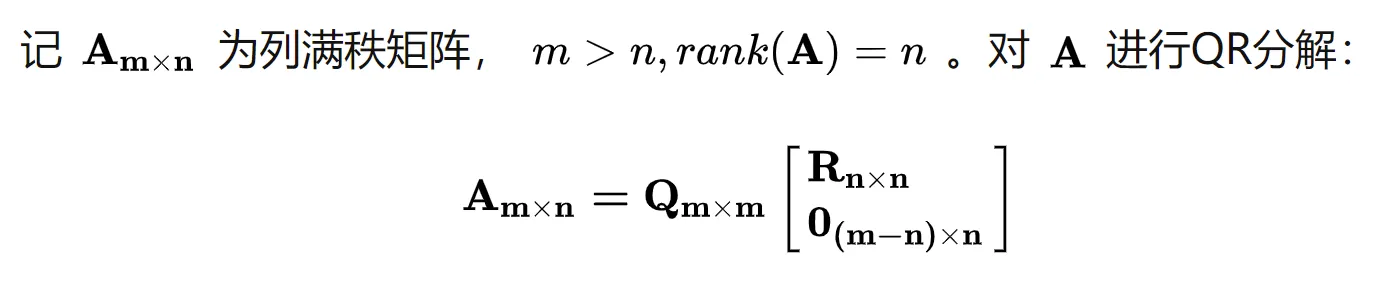
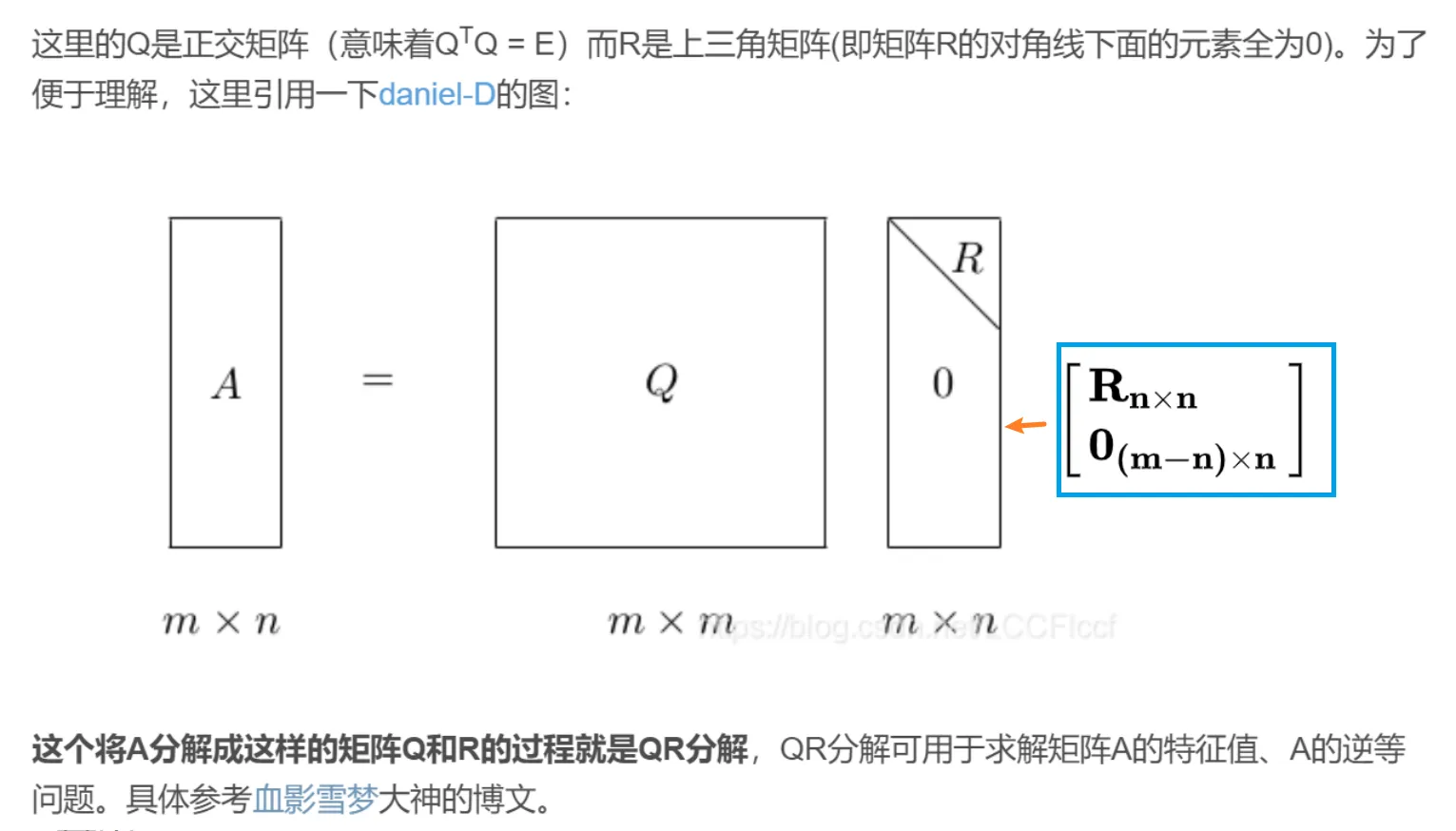
其中用到的正交的定义请看:
矩阵正交
表达式要点
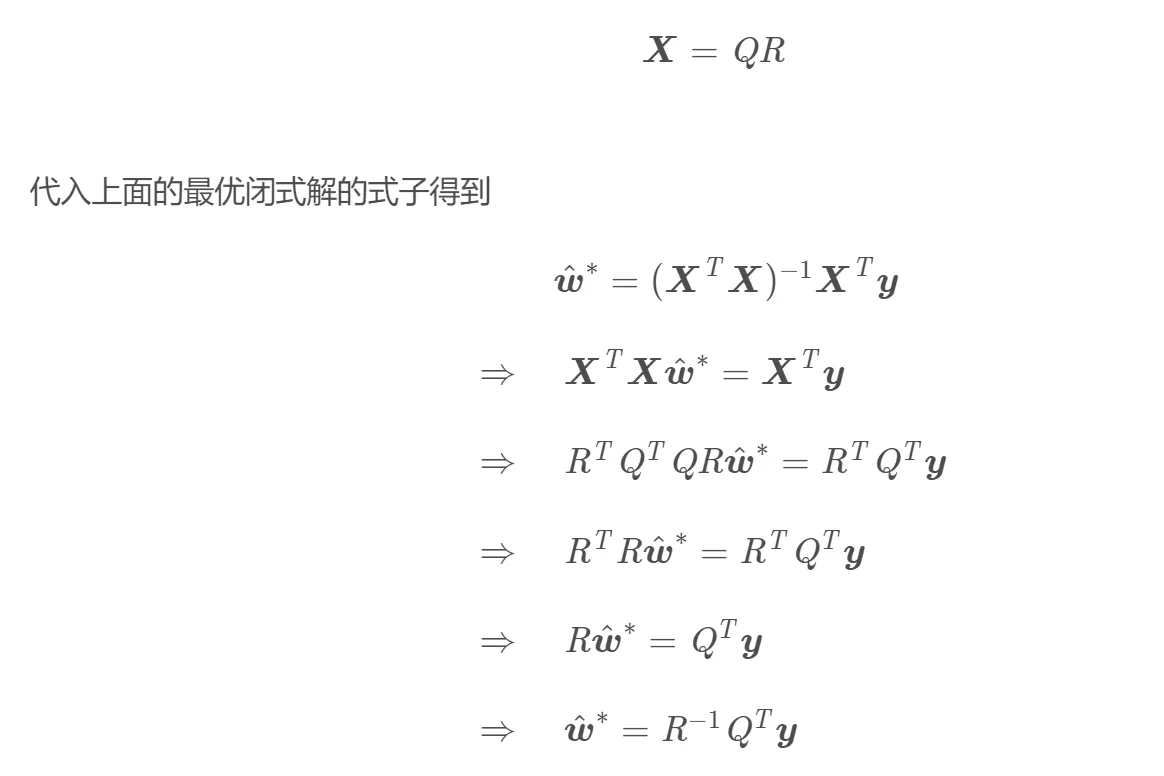
R中奇怪的QR分解和回归系数求导
R中的qr函数的返回值如下
qr a matrix with the same dimensions as x.
The upper triangle contains the of the decomposition
and the lower triangle contains information on the of the decomposition (stored in compact form).
Note that the storage used by DQRDC and DGEQP3 differs.
他这个compact form实在是有点迷,没有matlab中那么直接,
那么怎么办呢?应该传给qr.solve来处理
代码如下
datain = data.frame(
                     y = c(135,130,137.5,140,
                           142.5,127.5,125,122.5,120,117.5,115,112.5,110,
                           107.5,105,102.5,100,97.5,95,92.5,90,87.5,85,
                           82.5,80,78,75,72.5,70),
                    x1 = c(13.7,18.09,13.43,
                           16.15,14.67,10.9,13.7,21.49,15.06,13.48,15.28,
                           15.01,17.39,18.03,13.75,17.48,15.73,12.16,13.04,
                           13.03,12.4,15.22,13.39,12.53,16.3,14.07,16.5,
                           18.44,11.8),
                    x2 = c(12.68,17.51,21.73,
                           16.1,15.48,10.76,12.68,18,15.7,14.07,15.35,
                           13.84,16.44,16.49,13.57,15.13,14.41,12.55,11.15,
                           14.87,10.45,12.03,11.83,11.99,12.33,12.04,13.12,
                           13.54,11.73),
                    x3 = c(80.32,83.65,76.18,
                           84.09,81.72,70.84,80.32,78.78,70.6,72.6,79.83,
                           68.59,74.59,77.11,79.8,73.35,68.75,61.38,58.41,
                           69.55,59.27,46.35,52.41,52.38,55.99,50.66,
                           61.61,55.94,52.75),
                    x4 = c(0.16,0.26,0.19,0.19,
                           0.16,0.09,0.16,0.28,0.18,0.2,0.22,0.14,0.21,
                           0.19,0.14,0.19,0.13,0.15,0.13,0.16,0.14,0.19,
                           0.21,0.16,0.16,0.21,0.11,0.18,0.13)
          )
# 验证
lm(y ~ x1+x2+x4,data = datain )
# 结果
# Call:
#   lm(formula = y ~ x1 + x2 + x4, data = datain)
#
# Coefficients:
# (Intercept)  x1         x2      x4
# 56.801       -2.775     6.257   11.505

# 自己构建矩阵
y=datain[,1,drop=F]
x1=datain[,2,drop=F]
x2=datain[,3,drop=F]
x3=datain[,4,drop=F]
x4=datain[,5,drop=F]
ones = t(t(rep(1,nrow(y))))  # 两次t才能转为列向量
X=cbind(ones,x1,x2,x4)
testmqr <- qr(X) # QR分解
testu <- qr.solve(testmqr, y) # Ax=b
testu
# 结果一致
# ones        x1        x2        x4
# 56.801136 -2.775468  6.256896 11.505319
还是matlab中的直观,后续探索下如何把这种compat format分离出Q和R
Q = qr.Q(testmqr, complete = FALSE, Dvec =)
R = qr.R(testmqr, complete = FALSE)
solve(R) %*% t(Q)  %*% as.matrix(datain$y)
# 输出
          [,1]
ones 56.801136
x1   -2.775468
x2    6.256896
x4 11.505319所以要想得到Q,就对qr函数的结果用qr.R函数,其他的以此类推
辅助参考:
知乎上写的一个不错的例子
留言